
코딩기록
[Spring Boot] 1일차 01~05.Mybatis 본문
Spring Starter Project 생성
Spring Boot 는 톰캣이 안에 내장되어있음

window -> preferences -> usersettings 에 settings.xml 넣어주기
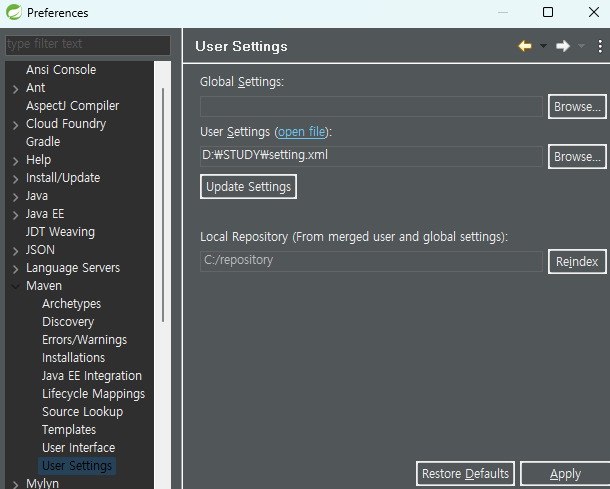
그리고 C드라이브에 repository 폴더 만들었는데 왜 만들었는지 기억안남
.m2 였나 거기도 있다고 들었는데 왜만든거지
02_Ajax
<html>
    <head>
        <meta charset="UTF-8">
        <title>J-QUERY</title>
        <script src="https://code.jquery.com/jquery-3.6.3.min.js"></script>
        <style>

        </style>
    </head>
    <body>
        <button onclick="ajaxCall('http://localhost:8080')">main</button>
        <button onclick="ajaxCall('http://localhost:8080/list')">list</button>
    </body>
    <script>
        function ajaxCall(url){
            $.ajax({
                url : url,
                type : 'get',
                data : {},
                success : function(data){
                    console.log(data);
                },error:function(e){
                    console.log(e);
                }
            });
        }
    </script>
</html>
ajax 로 요청을 보내고
이처럼 view 가 다른 곳에 있는 경우에는 controller에 @crossorigin 를 선언 한다.
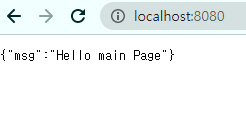
hashmap 에 메시지를 넣어서 map 에 넣어주고 리턴해준다.
package kr.co.gudi.controller;

import java.util.ArrayList;
import java.util.HashMap;

import org.springframework.web.bind.annotation.CrossOrigin;
import org.springframework.web.bind.annotation.RequestMapping;
import org.springframework.web.bind.annotation.RequestMethod;
import org.springframework.web.bind.annotation.RestController;

// CORS policy: No 'Access-Control-Allow-Origin'
// 기본적으로 view 와 server 는 같은 서버에 존재 한다.
// 현재는 html 이 서버 안에 존재하지 않는다.
// 이 경우(서버와 뷰가 다른 곳에 있는 경우...)보안상의 이유로 통신을 막는다.
// @CrossOrigin(origins={"허용 URL 1","허용 URL 2",...})
@CrossOrigin
@RestController
public class AjaxController {

	@RequestMapping(value="/", method = RequestMethod.GET)
	public HashMap<String, Object> main(){
		HashMap<String, Object> map = new HashMap<String, Object>();
		map.put("msg", "Hello main Page");

		return map;
	}

	@RequestMapping(value="/list", method = RequestMethod.GET)
	public HashMap<String, Object> list(){
		HashMap<String, Object> map = new HashMap<String, Object>();
		ArrayList<String> list = new ArrayList<String>();
		list.add("first");
		list.add("second");
		list.add("third");
		map.put("list",list);

		return map;
	}

}
server.port를 따로 선언해주지 않았기 때문에 localhost:8080 으로 들어간다.
05_Mybatis
spring boot 는 jsp 를 지원해주지 않기 때문에 따로 설정을 해줘야 한다.
체크해주면 pom.xml 에 자동으로 들어간다.

db 설정
MairaDB driver , MyBatis Framework 체크해주기
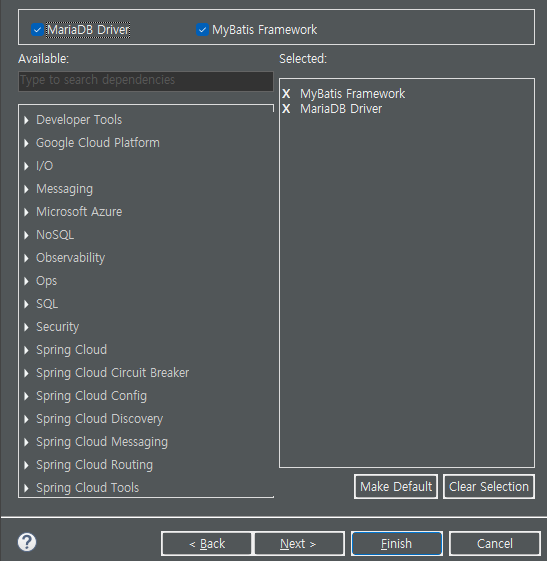
(순서대로)
서버 포트 지정
한글깨짐 설정
docker 주소로 db 정보 입력
mapper 폴더 아래 있는 mapper 장소 입력

'study' 카테고리의 다른 글
| 230601 [Spring BOOT] 13_Login - Properties (0) | 2023.06.01 |
|---|---|
| 230531 [Spring BOOT] 12_api (0) | 2023.05.31 |
| Day - 43 [Spring] FileService (0) | 2023.05.21 |
| Day - 44 [Spring] mybatis 다시 (0) | 2023.04.05 |
| Day - 44 [Spring] File Service - AJAX (0) | 2023.04.05 |
'study' Related Articles
more


